Does your monitor unplug from HDMI when you turn it off and mess up your desktop? Monitordetectkiller is the solution!

Remove Monitor Detection EDID override turn off disable monitor auto detect remove windows monitor autodetect

The computer detects when a TV/monitor is ‘turned off’ or ‘switched’ to another input. Then when powered-on or switched back, it gives the wrong resolution or breaks your extended display to reflect the single monitor, there may even be crashes and other issues.

Our hardware solution, the “MDK device” is a male to female modified adapter with integrated circuitry.

Now, the computer/device won’t receive a signal telling it the monitor is offline, thus avoiding any issues.

Source: Remove Monitor Detection disable monitor auto detect EDID

Buying a new Monitor / TV

When buying a new monitor there are 5 sites you should have open at all times:
1. The site selling monitors (eg plattetv.nl)
2. The comparison site Display specifications which allows you to search for models, add them to comparison lists and then view detailed specifications next to each other
3. A google search for the reviews of the model
4. AV Forums to search for good or bad experiences with the model.
5. Your price comparison site (eg Tweakers Pricewatch)

Also useful are sites that tell you what each model means, how the model number is built up. For Samsung you can use This site

The important specifications are:
What type of panel is it? (IPS / VA / PQL / OLED / Quantum Dot / QLED / MicroLED / etc)

Panel bit depth: is it 8 bits, 10 bits native or 10 bits (8 bits + FRC)

Colour bit depth: 30 bits?

Resolution: native UHD 3840×2160 pixels

Pixel density: higher is better

Display area: bigger is better

Static contrast: more is better

Response times (minimum / average) and input lag (for gaming): less is better

3D: if you think that’s important

frequency: most are 60Hz, some are 120Hz or 200Hz (higher is better)

Interpolation value: most are around 1200, higher is better

Power consumption: less is better

Other features:

  • connectivity (what kind of USB ports (3.0?), HDMI, Displayport etc fit in)
  • sizes
  • colour
  • stand size at the back
  • network (does it do 802.11n 5G and 802.11ac?)
  • features

Good luck!

Researchers Discover a Method That Could Triple Our Screen Resolutions

The researchers have outlined the technical details in a new study published in Nature. Basically, what they’ve done is figure out a method to control subpixels with voltage. Each pixel on an LCD screen contains three subpixels. Each of those subpixels handles one of three colors: red, green or blue. A white backlight shines through the pixel and the LCD shutter controls which subpixel is viewable. For instance, if the pixel should be blue, the LCD shutter will cover the red and green subpixels. In order to make purple, the shutter only needs to cover the green subpixel. The white backlight determines how light or dark the color will be.

The team at UCF’s NanoScience Technology Center has demonstrated a way of using an embossed nanostructure surface and reflective aluminum that could eliminate the need for subpixels entirely. On a test device, the researchers were able to control the color of each subpixel individually. Rather than one subpixel being dedicated to blue, it can produce the full range of color that the TV is capable of displaying. With each subpixel suddenly doing the work of three, the potential resolution of the device is suddenly three times as high. Additionally, this would mean that every subpixel (or in this case, a tinier pixel) would be on whenever displaying a color or white. That would lead to displays that are far brighter.

Source: Researchers Discover a Method That Could Triple Our Screen Resolutions

Refresh rates are a bit low, but the biggest hurdle will probably be your TV manufacturer refusing to incorporate this into a software update: they would much rather have you buy a new TV.

World’s thinnest hologram paves path to new 3D world – RMIT University

Now a pioneering team led by RMIT University’s Distinguished Professor Min Gu has designed a nano-hologram that is simple to make, can be seen without 3D goggles and is 1000 times thinner than a human hair.

“Conventional computer-generated holograms are too big for electronic devices but our ultrathin hologram overcomes those size barriers,” Gu said.

“Our nano-hologram is also fabricated using a simple and fast direct laser writing system, which makes our design suitable for large-scale uses and mass manufacture.

“Integrating holography into everyday electronics would make screen size irrelevant – a pop-up 3D hologram can display a wealth of data that doesn’t neatly fit on a phone or watch.
[…]
Dr Zengji Yue, who co-authored the paper with BIT’s Gaolei Xue, said: “The next stage for this research will be developing a rigid thin film that could be laid onto an LCD screen to enable 3D holographic display.

“This involves shrinking our nano-hologram’s pixel size, making it at least 10 times smaller.

“But beyond that, we are looking to create flexible and elastic thin films that could be used on a whole range of surfaces, opening up the horizons of holographic applications.”

Source: World’s thinnest hologram paves path to new 3D world – RMIT University

feeling things you touch in VR

haptics for VR walls and other objects [CHI17 fullpaper]
← SIC on EMS [UIST16 contest hardware]
Ad Infinitum: a parasite [ScienceGallery’17] →

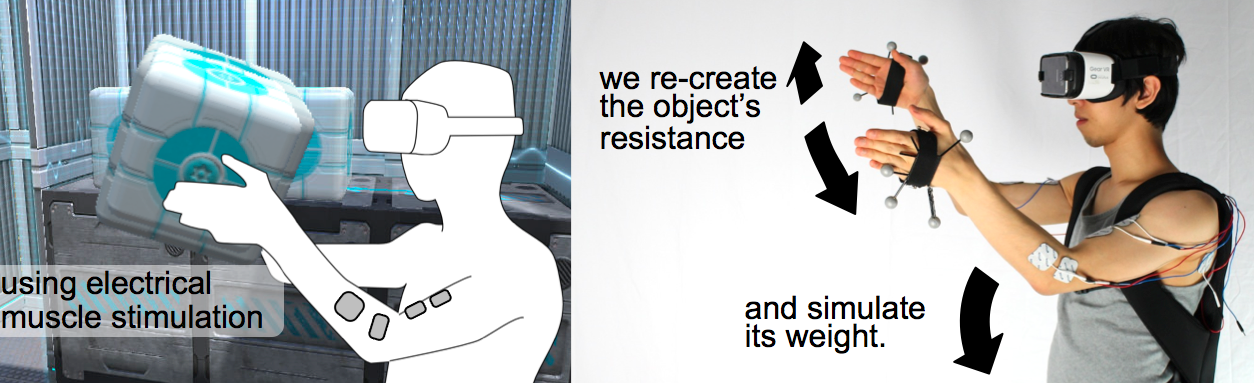
In this project, we explored how to add haptics to walls and other heavy objects in virtual reality. Our main idea is to prevent the user’s hands from penetrating virtual objects by means of electrical muscle stimulation (EMS). Figure 1a shows an example. As the shown user lifts a virtual cube, our system lets the user feel the weight and resistance of the cube. The heavier the cube and the harder the user presses the cube, the stronger a counterforce the system generates. Figure 1b illustrates how our system implements the physicality of the cube, i.e., by actuating the user’s opposing muscles with EMS.

Source: haptics for VR walls and other objects [CHI17 fullpaper] – pedro lopes research

Projection mapping on a moving surface

This research aims at overcoming this limitation and realizes dynamic projection mapping in which dynamically-changing real-world and virtual visual information are completely merged in the level of human visual perception. This high-speed dynamic projection mapping requires a high-speed projector enabling high-frame-rate and low-latency projection. In order to meet this demand, we have developed a high-speed projector “DynaFlash” that can project 8-bit images up to 1,000fps with 3ms delay.In particular, as a challenging target for the dynamic projection mapping, we focus on a non-rigid surface. Sensing of non-rigid surface deformation is difficult to be achieved at high speed because it has high degrees-of-freedom and involves self-occlusions as well as external occlusions. Our newly proposed method overcomes this limitation. Our method can obtain the deformation robustly at 1,000 fps by using an originally proposed marker “Deformable Dot Cluster Marker”, even when the target causes large deformation and occlusions.

Source: Vision Architecture: High Speed Image Processing

nodegoat – web based visualisation environment

nodegoat is a web-based data management, network analysis & visualisation environment.Using nodegoat, you can create and manage any number of datasets by use of a graphic user interface. Your custom data model autoconfigures the backbone of notegoat’s core functionalities.Within nodegoat you are able to instantly analyse and visualise datasets. nodegoat allows you to enrich data with relational, geographical and temporal attributes. Therefore, the modes of analysis are inherently diachronic and ready-to-use for interactive maps and extensive trailblazing.

Source: nodegoat

PrintScreen: print touch screens on anything, including paper

PrintScreen is an enabling technology for digital fabrication of customized flexible displays using thin-film electroluminescence (TFEL). It enables inexpensive and rapid fabrication of highly customized displays in low volume, in a simple lab environment, print shop or even at home. We show how to print ultra-thin (120 um) segmented and passive matrix displays in greyscale or multi-color on a variety of deformable and rigid substrate materials

via PrintScreen: Digital Fabrication of Thin-Film Displays | Embodied Interaction.

Aero Glass – AR for pilots using Epson Moverio glasses

Using the Epson Moverio glasses, Augmented reality projects the following features onto the lenses in 3D.

Airports
Navigation Aids
ADS-B traffic
Flight Plan route & waypoints
Airways
Geographic points of interest (cities, villages, visual navigation points)

Soon followed by:

Airspaces
Terrain elevation
Procedures
ILS approach cones
FLARM traffic (for glider)
Weather
Dynamic Data (NOTAM, TFRs)
Ground Phase stuff other than runways (taxiways, gates etc)
3D Terrain Avoidance
Obstacles

They plan to sell them for around $700,- which is very cheap for a fighter pilot helmet / Heads up display / HUD!

Aero Glass.

Sharp Develops Free-Form Display, Enables Vastly Greater Design Freedom for Displays

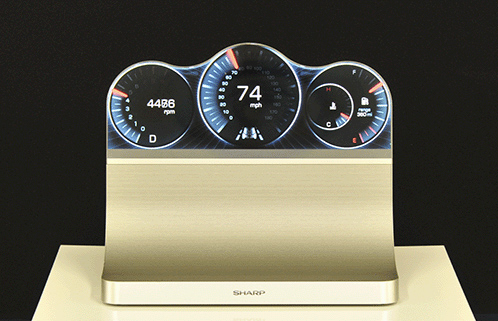
Sharp announces the development of the Free-Form Display, a device that can be shaped to meet a wide range of user needs thanks to the incorporation of IGZO technology and proprietary circuit design methods. Conventional displays are rectangular because they require a minimal width for the bezel in order to accommodate the drive circuit, called the gate driver, around the perimeter of the screen’s display area. With the Free-Form Display, the gate driver’s function is dispersed throughout the pixels on the display area. This allows the bezel to be shrunk considerably, and it gives the freedom to design the LCD to match whatever shape the display area of the screen needs to be.

via Sharp Develops Free-Form Display, Enables Vastly Greater Design Freedom for Displays | Press Releases | Sharp Global.

Flexibile, high definition CAAC-OS displays from SEL curve around bezels

As one way to utilize this flexibility, SEL have produced side-roll and top-roll OLED displays, with the display curving over the edge where a bezel would usually be.The prototypes on show were a 3.4-inch 960×540 pixel display with a resolution of 326 ppi, and a 5.4-inch 960×1280 pixel display with a 302 ppi resolution. They still provide the high color reproduction characteristic of OLED displays.

http://www.diginfo.tv/v/13-0084-d-en.php

This means that software can position buttons anywhere they like around the side of your mobile or tablet. The video in the link is very worth watching.