The Linkielist

Linking ideas with the world

The Linkielist

HOTAS, HOSAS, Dual Joysticks, Omnithrottle, Space and Flight sim controllers

What are these terms and how do they work in terms of control schemes? In this world you generally get what you pay for – if it’s cheap, then it’s probably plasticky and nasty. If it’s expensive, then it’s probably high quality. Saitek and Logitech have equipment running from low to midrange. Thrustmaster from mid to high range.

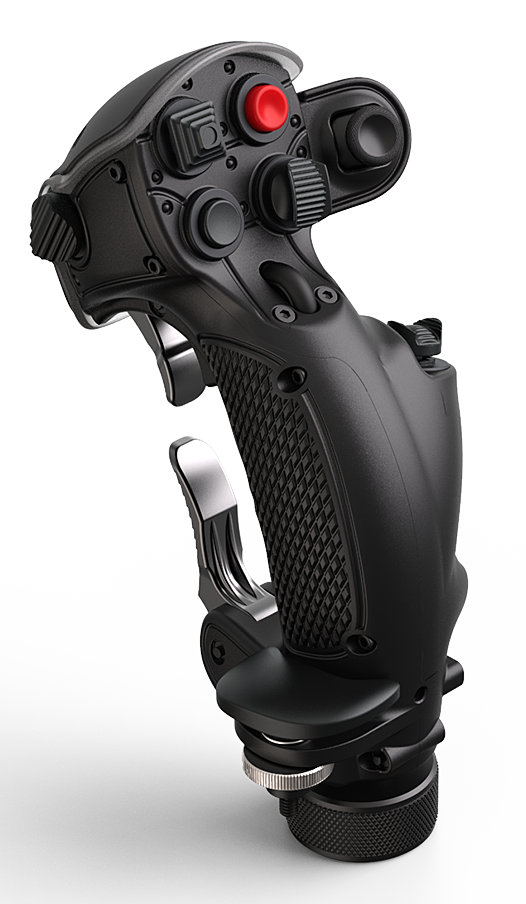
The VKB Gladiator NXT is currently the most popular midrange joystick you can find around $120 – $150 which comes in left and righthand versions.

If you have the money though, you go for the Virpil (VPC) Constellation Alpha (both left and right hand) and MongoosT-50CM2 grips and bases

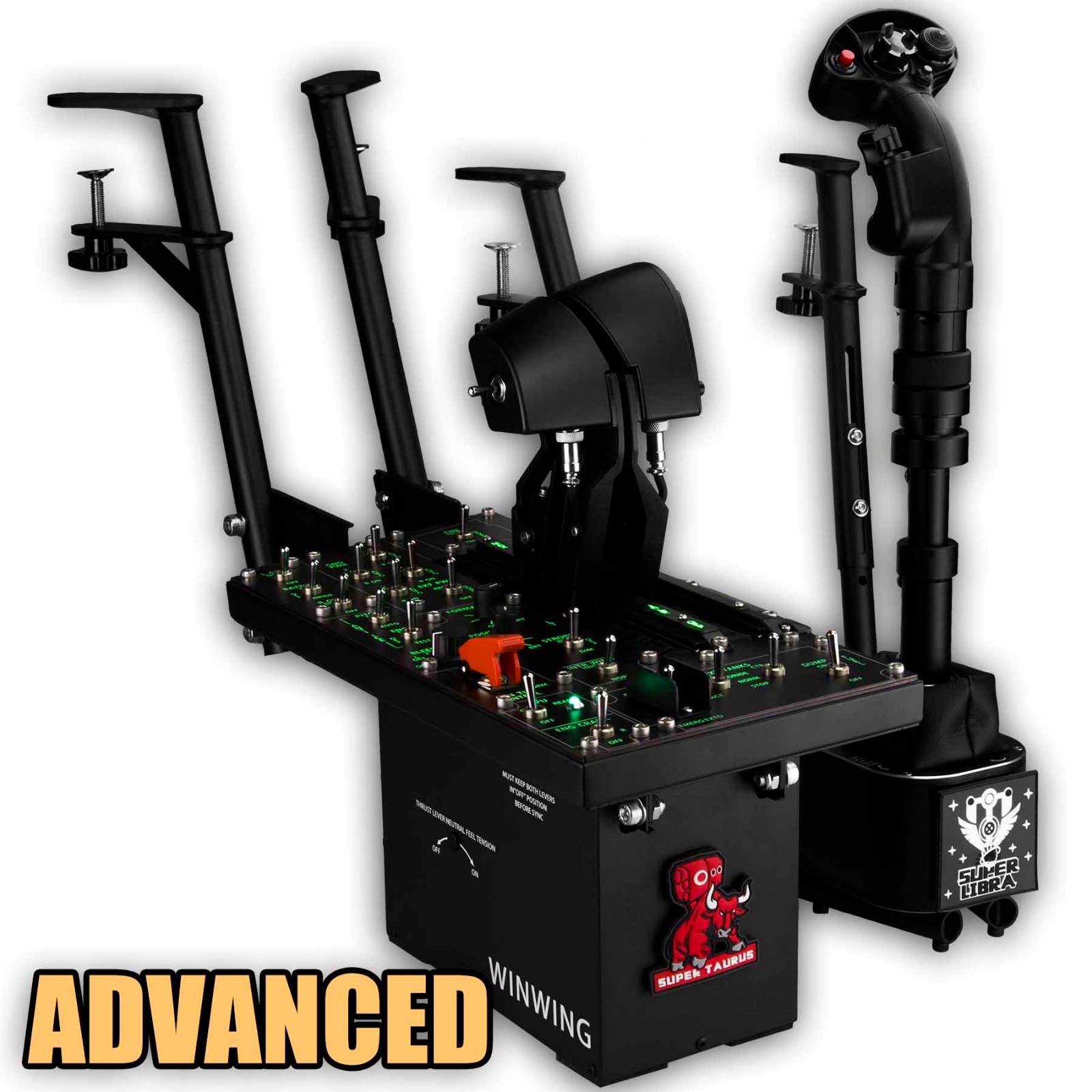
WingWin.cn has a very good F-16 throttle, stick and instrument panel with desk mounts

shop first image

HOTAS

The world of flight sim control used to be fairly straightforward: ideally you had a stick on the right, a throttle unit on the left and rudders in the middle. Some stick makers tried to replace the rudder with a twistable stick grip and maybe a little throttle lever on the stick so you could get full control cheaper – the four degrees of freedom (roll, yaw, pitch and thrust) / 4 DOF on a single stick. You had less buttons but you used the keyboard and mouse more.

HOSAS / Dual Stick

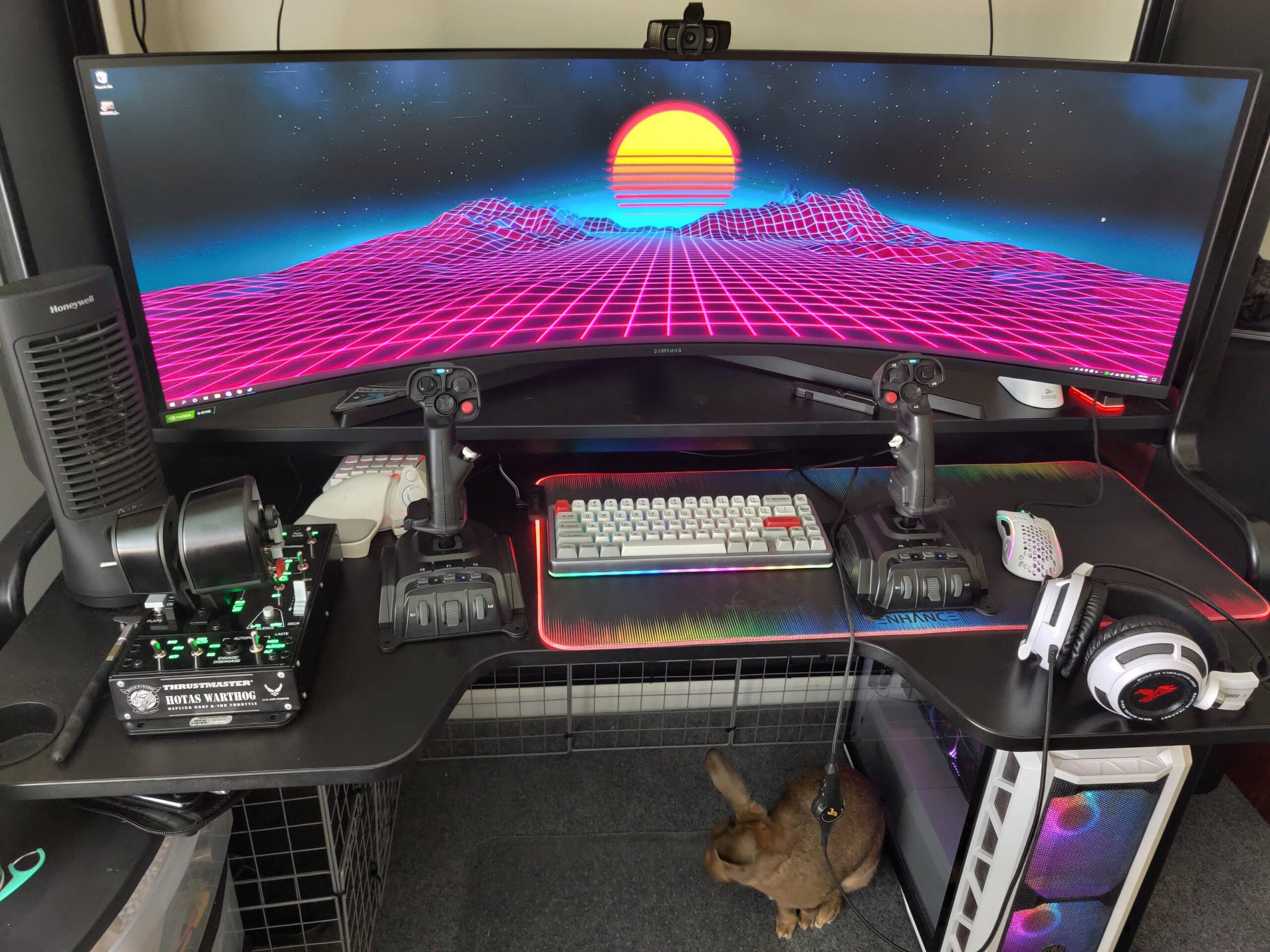
Now in the resurgence of the age of space sims – (Elite Dangerous, Star Citizen, No Mans Sky, Star Wars Squadrons and Tie Fighter Total Conversion to name a few) the traditional HOTAS (Hands on Throttle and Stick) is losing ground to the HOSAS (Hands on Stick and Stick). The HOSAS offers six degrees of freedom (6 DOF): roll, yaw, pitch, thrust + horizontal and vertical translation / strafing, which makes sense for a space plane that can not only go backwards but can also strafe directly upwards and downwards or left and right.

This gives rise to some interesting control schemes:

Left stick
x-axistranslate / strafe left + right
y-axisthrottle
z/twist-axistranslate / strafe up + down
Right stick
x-axisroll
y-axispitch
z/twist axisyaw

a variation which seems to be popular in Star Wars Squadrons is

Right stick
x-axisyaw
y-axispitch
z/twist-axisroll
`

another variation with throttling

Left stick
x-axistranslate / strafe left + right
y-axistranslate / strafe up + down
z/twist-axisthrust

often combined with:

rudder left footthrottle backwards / reverse
rudder right footthrottle forwards

Different combinations work better or worse depending on the person and how tiring it is for them personally. As Reddit user Enfiguralimificuleur points out: “It worked best for me with Z/twist being the throttle. I found it very efficient to adjust your speed properly. Very easy to stay at that speed as well.
However due to wrist issue and tendinitis, some positions are VERY awkward. Try pulling+right+twisting. Ouch. And even without the pain, this is not comfortable.”

Throttling and the Omnithrottle

The throttle can be set in different ways: a traditional HOTAS throttle is set to where it’s pushed to. Generally sticks have a recentering mechanism. This means that it’s easy to find reverse but can get annoying because to throttle you need to keep pushing the stick forwards. There are a few solutions to this.

First, The VKB gunfighter III base has a dry clutch which will remove the centering spring back of the pitch axes, meaning you can assign that to thrust and basicly have a stick that stays there mimicking a throttle while still allowing for rotation and roll axes.

Second, people can use a traditional throttle as well (so then I guess it becomes a HOTSAS)

Third, you can map a hat to 0, 50, 75, 100% speed and set speeds that way as a sort of cruise control

Fourth you can use the rudder (left foot back, front foot forward) or z-axis (twist) for thrust / throttle control. This will not eliminate the problem though.

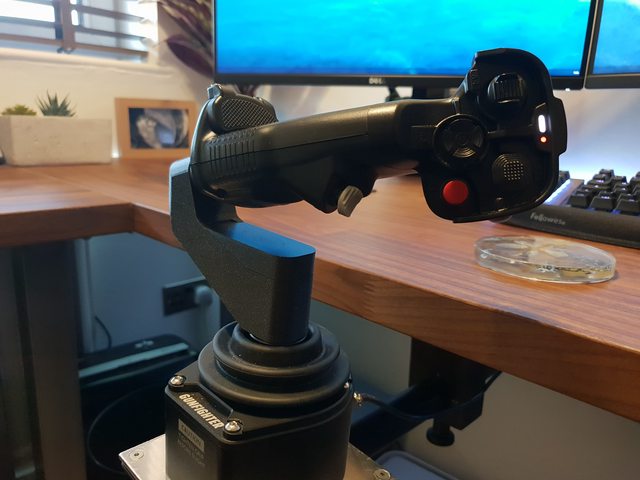
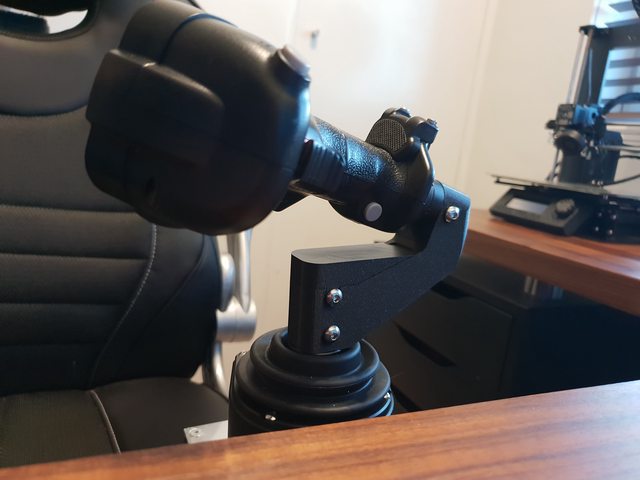
The omnithrottle is when you angle the left hand stick around 90 degrees downwards so that it looks like a throttle. You retain the three axes and the extra buttons and hats, giving you more freedom.

Sessine has a guide to converting a VKB stick to an omnithrottle – he gives credits to users JaguarMG and Pretagonist

This extension can also be found on Thingiverse with instructions

There is a Youtube video of the Angled Virpil Stick Adapter / Omnidirectional Throttle here using a Gardena hose to hose fixing adapter

and Issalzul has a two part writeup of their throttle (part 1 / part 2)

r/hotas - Finally finished my omnithrottle mod, thanks to this sub for giving me the idea!

For the VKB Gunfighter, ArtoriusPendragon has made a 3d file for the 3-Axis Throttle Adapter

r/HotasDIY - VKB Gunfighter 3-Axis Throttle Adapter

And Sarai_Seneschal has some tips on how to work with the #10 spring on his chair mounted HOSAS build.

r/hotas - VKB MCG Pro, VKB Kosmosima, Monstertech Chair Mount, 3D Printed throttle adapter designed by u/ArtoriusPendragon

CAD / 3D design mice

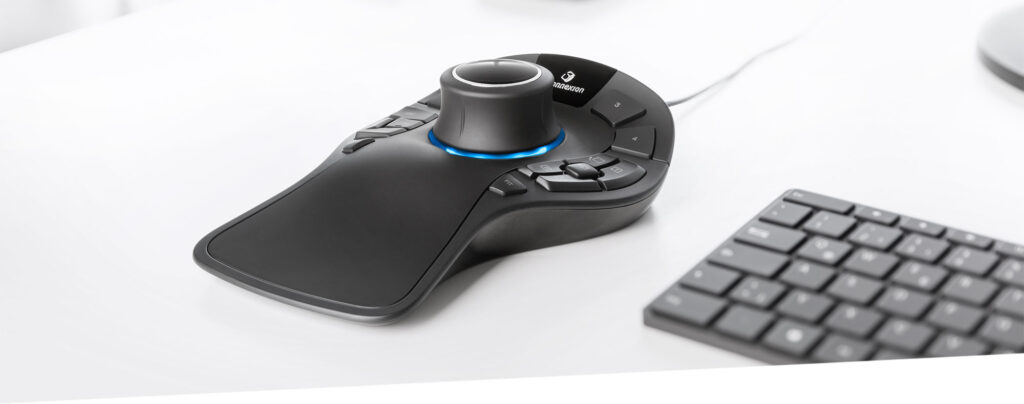
The 3D Connexion space mouse Pro has 12 programmable buttons and offers 6 DOF as well. It’s a left handed controller but might be interesting.

Attaching stuff to desks and stairs

For that I have a whole other post you can look at. Have fun!

Discuss

For Reddit discussions see r/HotasDIY and r/hotas – thanks for the input there, guys!

Researchers retrofit microscopes to take 3D images of cells in real-time

There’s a limit to what you can learn about cells from 2D pictures, but creating 3D images is a time-intensive process. Now, scientists from UT Southwestern have developed a new “simple and cost-effective” device capable of capturing multi-angle photos that can be retrofitted onto existing lab microscopes. The team say their solution — which involves inserting a unit of two rotating mirrors in front of a microscope’s camera — is 100 times faster than converting images from 2D to 3D.

Currently, this process involves collecting hundreds of photos of a specimen that can be uploaded as an image stack into a graphics software program, which then performs computations in order to provide multiple viewing perspectives. Even with a powerful computer, those two steps can be time-consuming. But, using their optical device, the team found they could bypass that method altogether.

What’s more, they claim their approach is even faster as it requires only one camera exposure instead of the hundreds of camera frames used for entire 3D image stacks. They discovered the technique while de-skewing the images captured by two common light-sheet microscopes. While experimenting with their optical method, they realized that when they used an incorrect amount of de-skew the projected image seemed to rotate.

“This was the aha! moment,” said Reto Fiolka, assistant professor at the Lyda Hill Department of Bioinformatics at UT Southwestern. “We realized that this could be bigger than just an optical de-skewing method; that the system could work for other kinds of microscopes as well.”

Using their modified microscope, the team imaged calcium ions carrying signals between nerve cells in a culture dish and looked at the circulatory system of a zebrafish embryo. They also rapidly imaged cancer cells in motion and a beating zebrafish heart. They also applied the optical unit to additional microscopes, including light-sheet and spinning disk confocal microscopy.

Source: Researchers retrofit microscopes to take 3D images of cells in real-time | Engadget

British right to repair law excludes smartphones and computers

A British right to repair law comes into force today, requiring manufacturers to make spares available to both consumers and third-party repair companies.

However, despite claiming to cover “televisions and other electronic displays,”‘ the law somehow excludes smartphones and laptops…


The European Union introduced a right to repair law back in March, and the UK agreed prior to Brexit that it would introduce its own version.

BBC News reports.

From Thursday, manufacturers will have to make spares available to consumers, with the aim of extending the lifespan of products by up to 10 years, it said […]

The right to repair rules are designed to tackle “built-in obsolescence” where manufacturers deliberately build appliances to break down after a certain period to encourage consumers to buy new ones.

Manufacturers will now be legally obliged to make spare parts available to consumers so appliances can be fixed.

Which? notes that the UK law ensures spares are available for either 7 or 10 years after the discontinuation of a product, but that it only covers four specific consumer product categories (plus some commercial/industrial ones).

Spare parts will have to be available within two years of an appliance going on sale, and up until either seven or 10 years after the product has been discontinued, depending on the part. Some parts will only be available to professional repairers, while others will be available to everyone, so you can fix it yourself.

For now, the right to repair laws only cover:

  • Dishwashers
  • Washing machines and washer-dryers
  • Refrigeration appliances
  • Televisions and other electronic displays

They also cover non-consumer electronics, such as light sources, electric motors, refrigerators with a direct sales function (eg fridges in supermarkets, vending machines for cold drinks), power transformers and welding equipment.

However, while you would expect “other electronic displays” to include iPhones, iPads, and most Macs, Which? states that these product categories are excluded.

Cookers, hobs, tumble dryers, microwaves or tech such as laptops or smartphones aren’t covered.

A cynical person might suspect some behind-the-scenes lobbying by Apple and other phone and computer brands…

Source: British right to repair law excludes smartphones and computers – 9to5Mac

Raspberry Pi Pico Oscilloscope

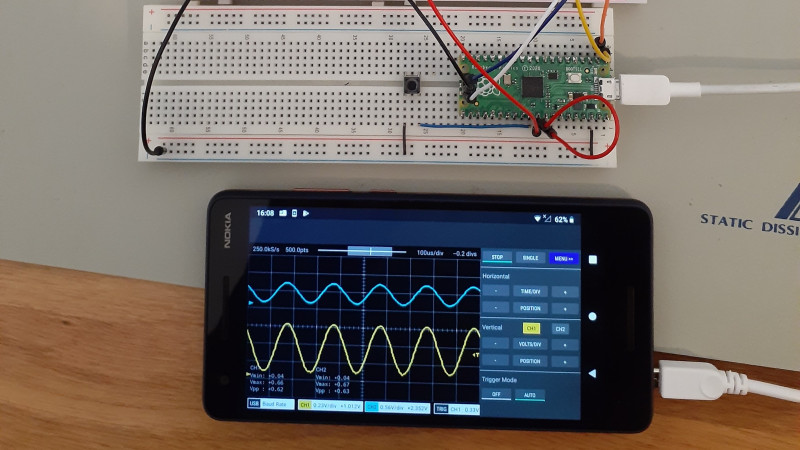
As you dive deeper into the world of electronics, a good oscilloscope quickly is an indispensable tool. However, for many use cases where you’re debugging low voltage, low speed circuits, that expensive oscilloscope is using only a fraction of its capabilities. As a minimalist alternative for these use cases [fhdm-dev] created Scoppy, a combination of firmware for the Raspberry Pi Pico and an Android app to create a functional oscilloscope.

As you would expect, the specifications are rather limited, capturing a maximum of 100 kpts at a speed of 500 kS/s shared between the two channels. Without some additional front end circuitry to protect the Pico, the input voltage is limited to 0-3.3 V. Neither the app nor the firmware is open source, and getting access to the second channel and removing ads requires a ~$3 in-app purchase. Even so, we can still think of plenty of practical uses for a ~$7 oscilloscope. If you do decide to add some front-end circuitry to change to voltage range, you can set them in the app, and switch between them by pulling certain GPIO pins high or low. The app has most of the basic oscilloscope features covered, continuous and single shot capture, adjustable trigger settings and a scalable waveform display.

Simple, cheap oscilloscopes like these have their place, but you start to understand why the “real” ones are so expensive when you see what goes into developing a high performance oscilloscope.

Source: Raspberry Pi Pico Oscilloscope | Hackaday

The New Sonos One SL Reminds Us That Smart Devices Have a Shelf Life, forces you to spying S2 update

[…]

if you’re thinking of buying a new One SL, you ought to keep in mind that it’ll only work with the newer Sonos S2 app.

This won’t be a problem for every Sonos owner, especially if you bought all your Sonos devices in the past year or two. It might be an issue, however, if you’re still operating a mix of newer and older Sonos hardware. Namely, the “legacy” Sonos products that were “killed off” last year. Those legacy gadgets will only work with the S1 app, and although Sonos committed to providing updates for these devices, controlling a mix of legacy and current Sonos gadgets isn’t possible on the S2 app.

[…]

Source: The New Sonos One SL Reminds Us That Smart Devices Have a Shelf Life

You can’t roll back from the old update which basically only seems to add rounded corners to backgrounds and break in dark mode – except that you allow Sonos to spy on you through the built in microphone with S2.

Brain implant lets people with paralysis write using their minds

[…]

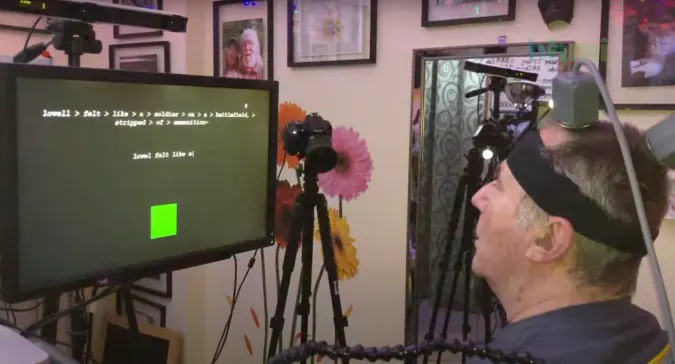
The new technique uses a computer to convert attempted handwriting movements from brain activity into on-screen text. As part of their tests, the team worked with a 65-year-old participant (named T5 in the study) who was paralyzed from the neck down due to a spinal cord injury sustained in 2007.

The researchers started by placing two brain chip implants into T5’s motor cortex — the part of the brain that controls movement. They told the participant to imagine he was writing normally with a pen on a piece of ruled paper. The brain chips then sent his neural signal through wires to a computer where an AI algorithm essentially transcribed his “mindwriting” by decoding hand and finger motion.

The end result saw T5 reach a writing speed of about 18 words per minute with 94.1 percent accuracy. Comparatively, an able-bodied adult of a similar age can type about 23 words per minute on a smartphone

[…]

Source: Brain implant lets people with paralysis write using their minds | Engadget

Lamps Double As Secret Surround Sound Speakers

Combined with today’s massive flat panel displays, a nice surround sound system can provide an extremely immersive environment for watching movies or gaming. But a stumbling block many run into is speaker placement. The front speakers generally just go on either side of the TV, but finding a spot for the rear speakers that’s both visually and acoustically pleasing can be tricky.

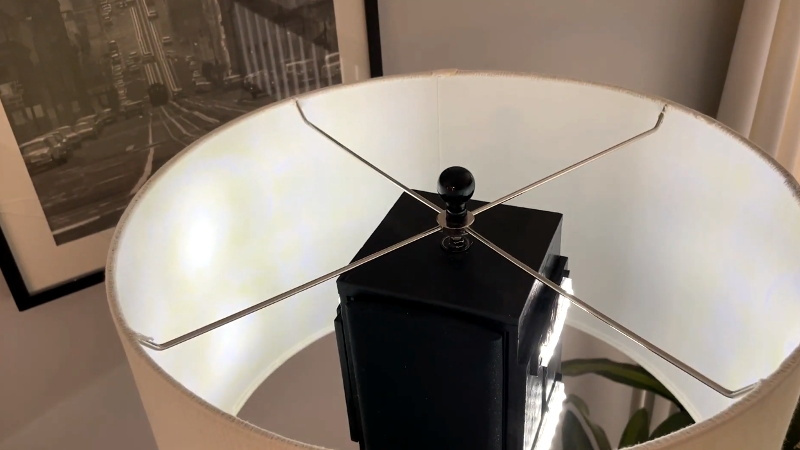
Which is why [Peter Waldraff] decided to take a rather unconventional approach and hide his rear surround sound speakers in a pair of functioning table lamps. This not only looks better than leaving the speakers out, but raises them up off the floor and into a better listening position. The whole thing looks very sleek thanks to some clever wiring, to the point that you’d never suspect they were anything other than ordinary lamps.

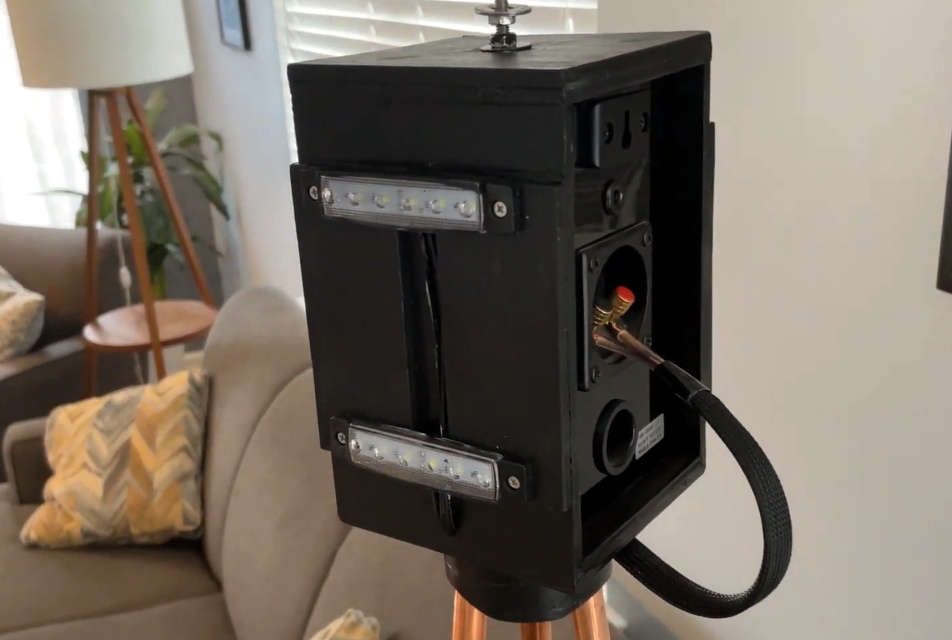
The trick here is the wooden box located at the apex of the three copper pipes that make up the body of the lamp. [Peter] mounted rows of LEDs to the sides of the box that can be controlled with a switch on the bottom, which provides light in the absence of a traditional light bulb. The unmodified speaker goes inside the box, and connects to the audio wires that were run up one of the pipes.

In the base, the speaker and power wires are bundled together so it appears to be one cable. Since running the power and audio wires together like this could potentially have resulted in an audible hum, [Peter] only ran 12 VDC up through the lamp to the LEDs and used an external “wall wart” transformer. For convenience, he also put a USB charging port in the center of the base.

When speakers or surround sound systems pass our way, it’s usually because some hacker has either made  a set from scratch, or has added some new and improved capabilities to their existing gear. This project may be a bit low-tech compared to some that have graced these pages, but it’s undoubtedly a clever and unexpected solution to the problem, and that’s a hack in our book.


Source: Lamps Double As Secret Surround Sound Speakers | Hackaday

Modding A Casio W800-H With A Countdown Timer – it’s a jumper setting

Stock, the Casio W800-H wristwatch ships with dual time modes, multiple alarms, and a stopwatch – useful features for some. However, more is possible if you just know where to look. [Ian] decided to dive under the hood and enable a countdown timer feature hidden from the factory.

The hack involves popping open the case of the watch and exposing the back of the main PCB. There, a series of jumpers control various features. [Ian]’s theory is that this allows Casio to save on manufacturing costs by sharing one basic PCB between a variety of watches and enabling features via the jumper selection. With a little solder wick, a jumper pad can be disconnected, enabling the hidden countdown feature. Other features, such as the multiple alarms, can be disabled in the same way with other jumpers, suggesting lower-feature models use this same board too.

It’s a useful trick that means [Ian] now always has a countdown timer on his wrist when he needs it. Excuses for over-boiling the eggs will now be much harder to come by, but we’re sure he can deal. Of course, watch hacks don’t have to be electronic – as this custom transparent case for an Apple Watch demonstrates. Video after the break.


Source: Modding A Casio W800-H With A Countdown Timer | Hackaday

Samsung Electronics Expands its Galaxy Upcycling Program to Enable Consumers to Repurpose Galaxy Smartphones into Smart Home Devices

With Galaxy Upcycling at Home, users can easily turn their old Galaxy devices² into smart home devices like a childcare monitor, a pet care solution and other tools that meet individual lifestyle needs.

Make Any Home a Smart Home

The Galaxy Upcycling at Home program provides enhanced sound and light-control features, by repurposing built-in sensors. Users can transform their old devices through SmartThings Labs, a feature within the SmartThings app.

[…]

For a device to continuously detect sound and light, it needs to be actively operating for long periods of time. For this reason, Samsung equipped the Galaxy Upcycling at Home upgrade with battery optimization solutions to minimize battery usage. Devices will also be able to connect effortlessly to SmartThings, allowing them to interact with countless other IoT devices in the SmartThings ecosystem.

[…]

Source: Samsung Electronics Expands its Galaxy Upcycling Program to Enable Consumers to Repurpose Galaxy Smartphones into Smart Home Devices – Samsung US Newsroom

So it can do sound and light detection stuff for you or be used as a controller for your other IoT equipment

A keyboard? How quaint: Logitech and Baidu link arms to make an AI-enabled, voice-transcribing mouse

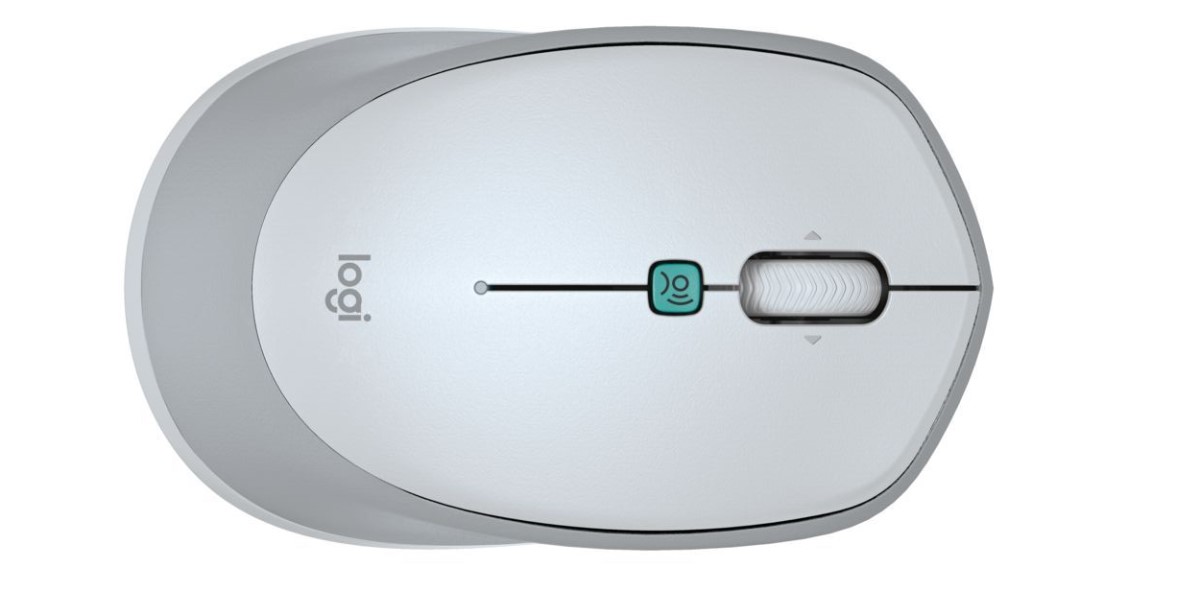
The Logitech Voice M380 wireless mouse looks and acts like a regular mouse but with a special button to initiate voice dictation. Baidu claimed recognition facilitates content creation at two to three times the speed of what one can type.

The device supports dictation in Chinese, English, and Japanese, and can translate content to English, Japanese, Korean, French, Spanish, and Thai. However, as of this month, you can only pick it up in China. There’s no word on when or if it will be available elsewhere.

Logitech M380 voice mouse

The Logitech M380 Baidu voice mouse. Click to enlarge

The mouse uses Baidu’s AI open platform Baidu Brain speech technology. The Chinese tech company said of the platform:

As of September 2020, Baidu Brain has developed more than 270 core AI capabilities and created over 310,000 models for developers.

Baidu Brain is made of a security module and four components: a foundation layer (uses open-source Chinese deep learning platform Paddle Paddle, Kunlun AI processors, and databases); the so-called “perception” layer (aggregates the company’s algorithm in voice technology, computer vision and AR/VR); a cognition layer (integrates new information); and a platform layer.

[…]

The mouse comes in three colours, graphite, rose, and off-white, and costs around $30 (£22, €25).

Source: A keyboard? How quaint: Logitech and Baidu link arms to make an AI-enabled, voice-transcribing mouse • The Register

Unlock your DJI’s FPV Drone and Crank Up The Power

Apparently, if the GPS on your shiny new DJI FPV Drone detects that it’s not in the United States, it will turn down its transmitter power so as not to run afoul of the more restrictive radio limits elsewhere around the globe. So while all the countries that have put boots on the Moon get to enjoy the full 1,412 mW of power the hardware is capable of, the drone’s software limits everyone else to a paltry 25 mW. As you can imagine, that leads to a considerable performance penalty in terms of range.

But not anymore. A web-based tool called B3YOND promises to reinstate the full power of your DJI FPV Drone no matter where you live by tricking it into believing it’s in the USA. Developed by the team at [D3VL], the unlocking tool uses the new Web Serial API to send the appropriate “FCC Mode” command to the drone’s FPV goggles over USB. Everything is automated, so this hack is available to anyone who’s running a recent version of Chrome or Edge and can click a button a few times.

[..]

Source: Web Tool Cranks Up The Power On DJI’s FPV Drone | Hackaday

Pixels Are Bluetooth Dice That Let You Play Online Games and Flash An internal LED

A pair of good dice is a guilty pleasure for a tabletop RPG gamer. You can never have enough, but I can tell you this: None are going to be as flashy as Pixels. These dice have an ace up their sleeve that the rest of your dice don’t have, because they light up and allow you to play online.

Yes, Pixels are electronic dice. Externally they look like ordinary resin dice, but when you throw them, their numbers light up using programmable LEDs. This alone would be enough for many players to smash the buy button on Kickstarter, where the product has already raised $2 million. But there’s more: The Pixels have a Bluetooth connection.

These days it’s not easy to get together with friends to play. Lockdowns have made things very complicated, but even without a pandemic, RPG players live in different cities, move to other countries, or simply can’t meet for meet several hours at other people’s houses on a regular basis. Online role-playing platforms that allow you to play different games over video calls are popping up, and these dice are compatible with popular services like D&D Beyond, Roll20, and Foundry.

Gif: Pixels

Both the lights and the Bluetooth run on small batteries and one die lasts around five hours on a charge. You can also turn off the LEDs to get in 20,000 rolls before the battery dies. Charging is wireless and uses an inductor hidden under one of its faces. The dice are sold separately or in kits containing D20, D12, D10, D8, D6, and D4 models.

[…]

Source: Pixels Are Bluetooth Dice That Let You Play Online Games

FarmBot | Open-Source CNC Farming robot

Drag and Drop Farming

Graphically design your farm by dragging and dropping plants into the map. The game-like interface is learned in just a few minutes so you’ll have the whole growing season planned in no time.

Farm from Anywhere

The FarmBot web app can be loaded on any computer, tablet, or smartphone with a modern web browser, giving you the power to manage your garden from anywhere at any time.

Using the manual controls, you can move FarmBot and operate its tools and peripherals in real-time. Scare birds away while at work, take photos of your veggies, turn the lights on for a night time harvest, or simply impress your friends and neighbors with a quick demo.

Source: FarmBot | Open-Source CNC Farming

How to build your own digital telescope

The sky is a fascinating place, but the real interesting stuff resides far beyond the thin atmosphere. The Universe, the Milky Way and our Solar System is where it’s at. To be able to peer far out through the sky and observe the galaxy and beyond, one needs a telescope.

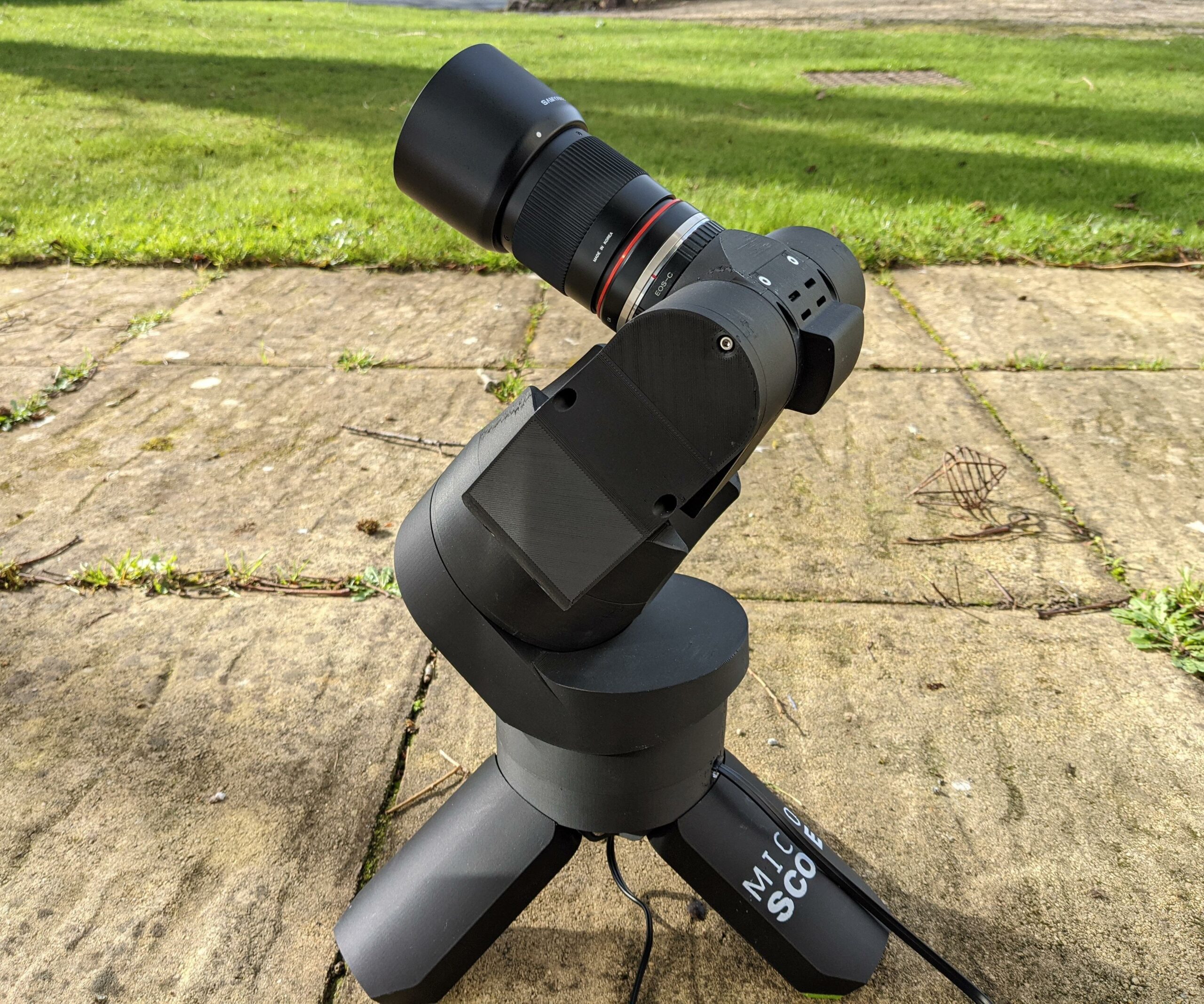
This Instructable follows my journey as I develop a miniture GOTO telescope. We’ll look through some of the research I perform, glimpse at my design process, observe the assembly & wiring processes, view instuctions for the software configuration and then finally step outside to scope out the cosmos.

The Micro Scope Features.

  • Raspberry Pi 4B & HQ Camera.
  • 300mm Mirror Lens.
  • Canon EOS Lens compatible.
  • NEMA 8 Geared Stepper Motors.
  • Fully GOTO with tracking.
  • GPS.
  • WiFi Enabled.
  • GT2 Belt Drive.
  • Hand Controller.
  • 3D Printed Parts.
  • Tripod.
  • OnStep Telescope Mount GOTO Controller.
  • INDI Server.
  • KStars/Ekos.

Bill Of Materials & 3D Printable Parts.

The BOM & STLs are available from Thingiverse (4708262). However, I recommend downloading The Micro Scope Build Pack as it contains extras not available from Thingiverse!

[…]

Source: The Micro Scope | a Miniture GOTO Telescope. : 41 Steps (with Pictures) – Instructables

SmartThings bricks all hardware (2013 – 2021) wtf?

If you own a 2013 SmartThings hub (that’s the original) or a SmartThings Link for the Nvidia Shield TV, your hardware will stop working on June 30 of this year. The device depreciation is part of the announced exodus from manufacturing and supporting its own hardware and the Groovy IDE that Samsung Smartthings announced last summer.  SmartThings has set up a support page for customers still using those devices to help those users transition to newer hubs.

[…]

Those who purchased one of these products in the last three years (Kevin just missed the window with his March 2018 purchase of the SmartThings Link for the Nvidia Shield) can share their proof-of-purchase at Samsung’s Refund Portal to find out if they are eligible for a refund. And in a win for those of us worried about e-waste, Samsung is also planning to recycle the older gear (or it will at least send you a prepaid shipping label so you can send back the devices for theoretical recycling).

[…]

Source: SmartThings starts saying goodbye to its hardware – Stacey on IoT | Internet of Things news and analysis

At least they are willing to recycle some of the stuff but this is why you don’t buy stuff that is dependent on the cloud.

Dynamic DIY Macro Keyboard Controls All The Things

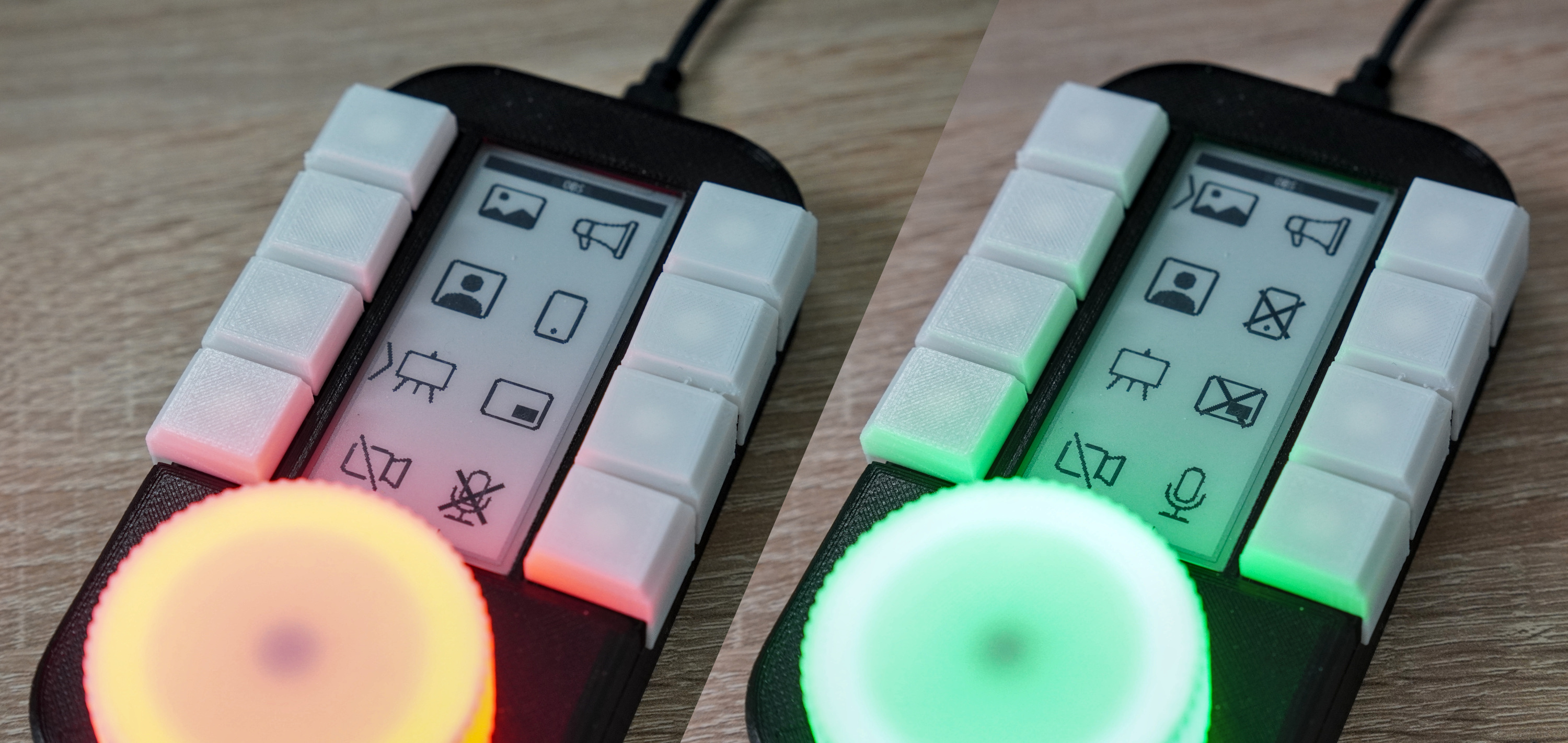
[Sebastian] needed a good set of of shortcuts for OBS and decided to make a macro keyboard to help out. By the time he was finished, [Sebastian] had macro’d all the things and built a beautiful and smart peripheral that anyone with a pulse would likely love to have gracing their desk.

The design started with OBS, but this slick little keyboard turned into a system-wide assistant. It assigns the eight keys dynamically based on the program that has focus, and even updates the icon to show changes like the microphone status.

This is done with a Python script on the PC that monitors the running programs and updates the macro keeb accordingly using a serial protocol that [Sebastian] wrote. Thanks to the flexibility of this design, [Sebastian] can even use it to control the office light over MQTT and make the CO2 monitor send a color-coded warning to the jog wheel when there’s trouble in the air.

This project is wide open with fabulous documentation, and [Sebastian] is eager to see what improvements and alternative enclosure materials people come up with. Be sure to check out the walk-through/build video after the break.

Inspired to make your own, but want to start smaller? There are plenty to admire around here.


Source: Dynamic Macro Keyboard Controls All The Things | Hackaday

A Bug in Lenovo System Update Service is Driving Up CPU Usage and Prompting Fan Noise in Laptops and Desktops, Customers Say

Since late January, most users running a pre-installed Lenovo image of Windows 10 has been bitten by a bug in Lenovo’s System Update Service (SUService.exe) causing it to constantly occupy a CPU thread. This was noticed by many ThinkPad and IdeaPad users as an unexpected increase in fan noise, but many desktop users might not notice the problem. I’m submitting this story to Slashdot because Lenovo does not provide an official support venue for their software, and the problem has persisted for several weeks with no indication of a patch forthcoming. While this bug continues to persist, anyone with a preinstalled Lenovo image of Windows 10 will have greatly reduced battery life on a laptop, and greatly increased power consumption in any case. As a thought experiment, if this causes 1 million systems to increase their idle power consumption by 40 watts, this software bug is currently wasting 40 megawatts, or about 1/20th the output of a typical commercial power station. On my ThinkPad P15, this bug actually wastes 80 watts of power, so the indication is that 40 watts per system is a very conservative number.

Lenovo’s official forums and unofficial reddit pages have seen several threads pop up since late January with confused users noticing the issue, but so far Lenovo is yet to issue an official statement. Users have recommended uninstalling the Lenovo System Update Service as a workaround, but that won’t stop this power virus from eating up megawatts of power around the world for those who don’t notice this power virus’s impact on system performance.

Source: A Bug in Lenovo System Update Service is Driving Up CPU Usage and Prompting Fan Noise in Laptops and Desktops, Customers Say – Slashdot

Metalenz Wants to Jump-Start Phone Cameras Again With Better Lenses

A new company called Metalenz, which emerges from stealth mode today, is looking to disrupt smartphone cameras with a single, flat lens system that utilizes a technology called optical metasurfaces. A camera built around this new lens tech can produce an image of the same if not better quality as traditional lenses, collect more light for brighter photos, and can even enable new forms of sensing in phones, all while taking up less space.

[…]

“The optics usually in smartphones nowadays consists of between four and seven lens elements,” says Oliver Schindelbeck, innovation manager at the optics manufacturer Zeiss, which is known for its high-quality lenses. “If you have a single lens element, just by physics you will have aberrations like distortion or dispersion in the image.”

More lenses allow manufacturers to compensate for irregularities like chromatic aberration (when colors appear on the fringes of an image) and lens distortion (when straight lines appear curved in a photo). However, stacking multiple lens elements on top of each other requires more vertical space inside the camera module.

[…]

Phone makers like Apple have increased the number of lens elements over time, and while some, like Samsung, are now folding optics to create “periscope” lenses for greater zoom capabilities, companies have generally stuck with the tried-and-true stacked lens element system.

[…]

Instead of using plastic and glass lens elements stacked over an image sensor, Metalenz’s design uses a single lens built on a glass wafer that is between 1×1 to 3×3 millimeter in size. Look very closely under a microscope and you’ll see nanostructures measuring one-thousandth the width of a human hair. Those nanostructures bend light rays in a way that corrects for many of the shortcomings of single-lens camera systems.

[…]

Light passes through these patterned nanostructures, which look like millions of circles with differing diameters at the microscopic level. “Much in the way that a curved lens speeds up and slows down light to bend it, each one of these allows us to do the same thing, so we can bend and shape light just by changing the diameters of these circles,” Devlin says.

[…]

nd the design doesn’t just conserve space. Devlin says a Metalenz camera can deliver more light back to the image sensor, allowing for brighter and sharper images than what you’d get with traditional lens elements.

Another benefit? The company has formed partnerships with two semiconductor leaders (that can currently produce a million Metalenz “chips” a day), meaning the optics are made in the same foundries that manufacture consumer and industrial devices—an important step in simplifying the supply chain.

New Forms of Sensing

Metalenz will go into mass production toward the end of the year. Its first application will be to serve as the lens system of a 3D sensor in a smartphone. (The company did not give the name of the phone maker.)

[…]

Source: Metalenz Wants to Jump-Start Phone Cameras Again With Better Lenses | WIRED

These 3D-Printed Fish Bots Can Swarm and School

Researchers have made a smart school of robotic fish that swarm and swim just like the real deal, and they offer promising insights into how developers can improve decentralized, autonomous operations for other gizmos like self-driving vehicles and robotic space explorers. Also, they’re just pretty stinking cute.

These seven 3D-printed robots, or Bluebots, can synchronize their movements to swim in a group, or Blueswarm, without any outside control, per research published in Science Robotics this month from the Harvard John A. Paulson School of Engineering and Applied Sciences and the Wyss Institute for Biologically Inspired Engineering.

Equipped with two wide-angle cameras for eyes, each bot navigates their tank by tracking the LEDs lights on their peers. Based on the cues they observe, each robot reacts accordingly using an onboard Raspberry Pi computer and custom algorithm to gauge distance, direction, and heading.

“Each Bluebot implicitly reacts to its neighbors’ positions,” explains Florian Berlinger, a PhD candidate at SEAS and Wyss and first author of the research paper, per a press release. “So, if we want the robots to aggregate, then each Bluebot will calculate the position of each of its neighbors and move towards the center. If we want the robots to disperse, the Bluebots do the opposite. If we want them to swim as a school in a circle, they are programmed to follow lights directly in front of them in a clockwise direction.”

Previous robotic swarms could navigate in two-dimensional spaces, but operating in three-dimensional spaces like air or water has proven tricky. The goal of this research was to create a robofish swarm that could move in sync all on their own without the need for WiFi or GPS and without input from their human handlers.

Source: These 3D-Printed Fish Bots Can Swarm and School

Myopia correcting ‘smart glasses’ from Japan to be sold in Asia – Snake Oil or …?

Can a pair of unique spectacles banish nearsightedness without surgical intervention? Japan’s Kubota Pharmaceutical Holdings says its wearable device can do just that, and it plans to start releasing the product in Asia, where many people grapple with myopia.

The device, which the company calls Kubota Glasses or smart glasses, is still being tested. It projects an image from the lens of the unit onto the wearer’s retina to correct the refractive error that causes nearsightedness. Wearing the device 60 to 90 minutes a day corrects myopia according to the Japanese company.

Kubota Pharmaceutical has not disclosed additional details on how the device works. Through further clinical trials, it is trying to determine how long the effect lasts after the user wears the device, and how many days in total the user must wear the device to achieve a permanent correction for nearsightedness.

[…]

Kubota began clinical trials on the device last July after confirming the therapeutic effect of the mechanism using a desktop system. It is also developing a contact lens-type myopia correction device.

Kubota, which made its debut on the Tokyo Stock Exchange’s Mothers market for startups in December 2016, develops drugs and devices for the treatment of vision problems.

Source: Myopia correcting ‘smart glasses’ from Japan to be sold in Asia – Nikkei Asia

DARPA Announces Subterranean Challenge Finals: mapping out underground tunnels, caves, evil lairs by robot

After three years of development, DARPA Subterranean (SubT) Challenge teams will get the chance to compete in the Final Event being held at the Louisville Mega Cavern in Louisville, Kentucky on September 21-23, 2021.

The DARPA SubT Challenge aims to develop innovative technologies that can rapidly map, navigate, and search complex underground environments such as human-made tunnel systems, urban undergrounds, and natural cave networks. Teams compete by demonstrating how their autonomy, networking, perception, and mobility capabilities perform on either physical courses in the Systems Competition or simulated environments in the Virtual Competition. The best performing team in the Systems Competition will be awarded a $2 million prize while the best performing team in the Virtual Competition will be awarded a $750,000 prize.

Over the last two years, teams faced a series of preliminary circuit events – the Tunnel Circuit, Urban Circuit, and Cave Circuit – to demonstrate how their solutions address the unique challenges of each subdomain. Teams will now tackle competition courses that include challenge elements from all three subdomains at the same time.

“Whether it’s the systems courses that we are building inside the Mega Cavern, or the wildly varying virtual environments we’re designing in the SubT Virtual Testbed, I’m excited to see how all of the SubT Challenge competitors build on the knowledge they gained during the Circuit Events to be successful in the Final Event.” said Dr. Timothy Chung, program manager for the Subterranean Challenge in DARPA’s Tactical Technology Office.

While many competitors are already preparing for the Final Event, new teams still have an opportunity to qualify for the Systems and Virtual Competitions. In order to participate, teams must deploy autonomous robotic systems – either real or virtual – into the competition courses to map, navigate, and search for artifacts of interest. The locations of each artifact must be reported with an accuracy of at least five meters to score a point. The competition courses are intentionally designed to emulate the dangers of rescue efforts in collapsed mines, post-earthquake search and rescue in urban underground settings, and cave rescue operations for injured or lost spelunkers.

For additional information on the DARPA Subterranean Challenge, including how to compete in this September’s event, please visit www.subtchallenge.com

Source: DARPA Announces Subterranean (SubT) Challenge Final Event Site and Date

NextMind’s brain-computer interface is ready for developers

NextMind is the latest in a long line of companies trying to harness the brain as a means of controlling our digital world. At first, its take on things may seem familiar: Don a headset which places a sensor on the back of your head, and it’ll detect your brainwaves which can then be translated into digital actions. One area where NextMind differs is that the sensor seems more practical than many we’ve seen and won’t leave you looking like a shower cap-wearing lab rat. In fact, the wearable can just as easily clip onto the rear of a snapback.

Beyond size and aesthetics, NextMind’s technology also seems fairly mature. I tried a demo (via the developer kit which goes on sale today for $399) and was surprised by how polished the whole experience was. Set up involved just one basic “training” exercise and I was up and running, controlling things with my mind. The variety of demos made it clear that NextMind is thinking way beyond simple mental button pushes.

There’s still a slight learning curve to get the “knack” — and it won’t replace your mouse or keyboard just yet. Mostly because we’ll need to wait for a library of apps to be built for it first, but also it’s still a new technology — and it takes some practice to become “fluent” with it, as my terrible performance on a mind-controlled game of Breakout can attest. But the diverse and creative demo applications I experienced do hold a lot of promise.

NextMind brain-computer interface

James Trew / Engadget

Right now, the applications are pretty simple: Mostly controlling media and games and so on, but NextMind’s founder and CEO, Sid Kouider is confident the technology will evolve to the point where you can simply think of an image to search for it, for example. There are also complementary technologies, like AR, where this sort of control not only seems apt, but almost essential. Imagine donning some augmented reality glasses and being able to choose from menu items or move virtual furniture around your room just with a glance.

The technology driving things is familiar enough: The sensor is an EEG that gently rests against the back of your head. This position is key, according to Kouider, as that’s where your visual cortex’s signals can most easily (or comfortably) be reached. And it’s these signals that NextMind uses, interpreting what you are looking at as the item or signal to be acted upon. In its simplest form, this would be a button or trigger, but the demos also show how it can be used to DJ, copy and paste and even augment (instead of simply replace) other inputs, such as that mouse or a game controller you are already using.

Source: NextMind’s brain-computer interface is ready for developers | Engadget

The first phone with an under-display camera goes on sale December 21st

You won’t have to wait much longer to buy the first phone with an under-display camera — if you live in the right country. ZTE now plans to release the Axon 20 5G in 11 countries and regions on December 21st, including the UK, European Union, Japan and South Korea. The company didn’t reveal pricing, but said it would be available “soon.”

The centerpiece remains an uninterrupted 6.92-inch FHD+ OLED screen that uses a combination of materials, display syncing and a “special matrix” to hide a 32-megapixel selfie camera. You won’t find a cutout or notch here. It’s a thoroughly mid-range phone beyond that, though. The Axon 20 5G runs on a Snapdragon 765G chip with 8GB of RAM, and its stand-out features beyond the front camera include a 90Hz refresh rate and DTS:X Ultra 3D sound.

You can expect a 64MP main rear camera, an 8MP ultra-wide, a 2MP macro cam and a 2MP depth sensor. The 4,220mAh battery is also unspectacular given the size and 5G, although 30W fast charging should help it top up quickly.

5G, although 30W fast charging should help it top up quickly.

Source: The first phone with an under-display camera goes on sale December 21st | Engadget

Good stuff! I absolutely hate the cut out notch!

Oppo’s X 2021 rollable concept phone expands in your hand

Today’s Inno Day 2020 event unveiled the Oppo X 2021 concept smartphone, which is all about its “continuously variable OLED display.” With a simple swipe on a button, the phone is able to transform between a regular 6.7-inch size and a tablet-like 7.4-inch size, and the software interface adapts accordingly for optimal experience — be it for single-hand usage or for multi-tasking.

Oppo X 2021 rollable concept phone demo.

Oppo

In a demo shown to Engadget, the prototype magically toggled between two screen sizes, with the video resizing itself on the fly to fill the screen. Similarly, the system menus and Twitter also switched between their phone interface and tablet interface to match the screen size. Oppo added that the user can freely customize the screen size, so you’re not just limited to either 6.7 inches or 7.4 inches. Hence the “continuously variable” label.

Oppo X 2021's Warp Track and 2-in-1 Plate.

Oppo

Oppo wasn’t afraid to explain the magic here. The phone is essentially a motorized scroll, with a large part of the OLED panel laminated onto a “Warp Track” for improved strength, as it goes around a “Roll Motor” (with a 6.8mm scroll diameter) on the left to tuck itself into a hidden compartment. The phone itself consists of a “2-in-1 Plate” body construction: these two parts roll out simultaneously and evenly for better structural support.

Oppo applied for 122 patents for this project, 12 of which were on the scroll mechanism alone. The company stopped short at providing further details — no word on the screen specs, the panel’s supplier nor durability figures. Levin Liu, OPPO Vice President and Head of OPPO Research Institute, stressed that the Oppo X 2021 is still in concept stage, but he hopes to bring this technology to consumers “at the right time.”

Source: Oppo’s X 2021 rollable concept phone expands in your hand | Engadget

There’s a Massive Recall of Amazon Neighbourhood Spy Ring Doorbells –  might explode in flames

In a year where it seems everything is both literally and figuratively on fire, it’s not surprising that we can now add Amazon’s Ring Video Doorbell to the list. Yes, it turns out that the device you purchased and installed for the purpose of making your home safer is itself a safety hazard. As a result, Amazon has issued a massive recall of its popular doorbell/spy camera. Here’s what to know.

What’s going on with Ring Doorbells?

Amazon is recalling approximately 350,000 Ring Video Doorbells (2nd Generation) sold through Amazon.com, Ring.com, and at third-party electronics and home goods stores in the United States and Canada between June and October 2020. The company made this decision after receiving reports of 85 incidents tied to incorrectly installed doorbells—23 of which involve doorbells igniting and causing minor property damage, in addition to eight reports of minor burns.

According to the Consumer Product Safety Commission (CPSC), the video doorbell’s battery can overheat if the wrong type of screws are used to install the device, posing fire and burn hazards. As a result, the CPSC advises that consumers immediately stop installing the recalled video doorbells.

Source: There’s a Massive Recall of Amazon Ring Doorbells

You shouldn’t have one of these hacker vulnerable privacy invasion machines anyway.